
Moving an Invoice to Another Project
Sometimes work is billed under one project and later belongs somewhere else. For example, an add-on was invoiced from the main contract, and you then create a separate project for it. Owners and administrators can move an issued invoice, including a paid one, to another project for the same client. Your workspace must allow this first.
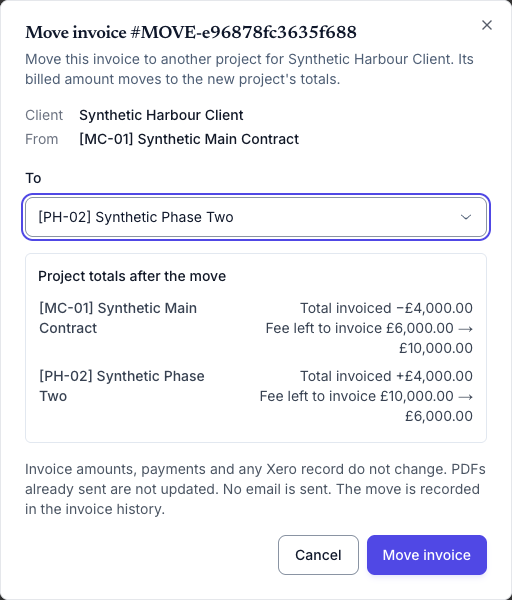
After the move, the invoice’s billed amount stops counting toward the original project and counts toward the new one. For example, if a £4,000 invoice moves from a £10,000 fixed-fee project to another £10,000 fixed-fee project, the original project’s fee left to invoice goes from £6,000 back to £10,000, and the new project’s goes from £10,000 to £6,000.
Moving an invoice changes only which project it counts toward in Keito. The invoice number, dates, line items, amounts, tax, payments, and paid status stay exactly as they are.
Turn on the workspace setting
- Sign in as the workspace owner or an administrator.
- Open Invoices → Configure → Default Values.
- Select Allow corrections to issued invoice details.
- Click Save default values.
The setting is off by default and applies to the current workspace. The same setting lets owners and administrators correct billing details on issued invoices. Managers and members cannot change it or move invoices.
Move an invoice
- Open the invoice.
- Click the More invoice actions button (⋯) and choose Move to another project….
- Under To, select the project. The list shows the client’s other active projects.
- Review Project totals after the move. For both projects, Keito shows how Total invoiced changes and, for fixed-fee projects, how much of the fee is left to invoice.
- Click Move invoice.
Keito confirms that the invoice moved. The project shown under the invoice title changes to the new project, and the invoice appears on that project’s Invoices tab.

The invoice’s history records Moved to another project with the previous and new projects, who moved it, and when. The move is also recorded in the workspace audit log.
What changes and what stays the same
| Changes | Stays the same |
|---|---|
| The project every line item belongs to | Invoice number, issue date, due date, and status |
| Total invoiced on both projects | Line descriptions, quantities, rates, amounts, tax, and discounts |
| Fixed-fee balances (uninvoiced amount) on both projects | Recorded payments and paid status |
| Project reports, which follow the invoice’s current project | The client, and anything already sent to the client |
Line items without a project, such as a note line, stay without a project.
- Emails and PDFs: moving an invoice doesn’t send an email. PDFs you already sent stay as they were. A PDF you download or send later uses the new project’s column settings if they differ, for example if the new project hides the quantity column.
- Xero: nothing is sent to Xero, and the Xero invoice and its payments don’t change. Keito doesn’t send projects to Xero, so you can move a Xero-linked invoice.
- QuickBooks Online: invoices copied to QuickBooks can’t be moved, because QuickBooks files each invoice under a project sub-customer. If someone moves an invoice while another person is copying it to QuickBooks, the copy stops and asks you to refresh the invoice.
- Invoices imported from Harvest: you can move them. If you later refresh the Harvest import, Keito restores the project the invoice has in Harvest.
When you can’t move an invoice
The whole invoice moves, and only to an active project of the same client. Move to another project… doesn’t appear for drafts (edit their line items instead), voided invoices, or invoices with no project.
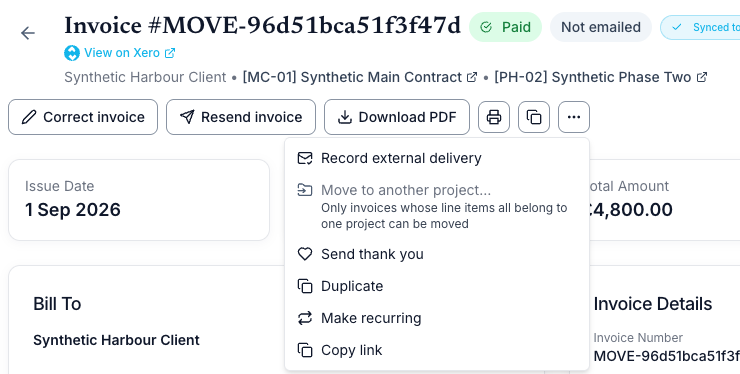
When an invoice can’t move, the menu item is unavailable and the reason appears beneath it.
| Reason shown | What it means |
|---|---|
| Only invoices whose line items all belong to one project can be moved | The invoice already covers more than one project. Moving part of an invoice isn’t supported. |
| Invoices with linked time or expenses cannot be moved | Time entries or expenses are attached to the invoice, including billed work linked through a Harvest import. That work stays on its own project. |
| Invoices created from an estimate cannot be moved | The invoice was converted from an estimate. |
| Invoices linked to a retainer cannot be moved | The invoice funds or draws on a retainer. |
| QuickBooks routes this invoice to a project sub-customer | The invoice was copied to QuickBooks Online. |
| Invoices with a recorded credit correction cannot be moved | A credit correction is recorded against the invoice. |
| Invoices that allocate project time credit cannot be moved | The invoice created project time credit for future billable time. |
| Invoices with a frozen delegated delivery document cannot be moved | The invoice was delivered through delegated delivery and its document is locked. |
You might also see these messages in the dialog:
| What you see | What to do |
|---|---|
| No other active projects for the client | Create the new project for the same client, or unarchive it, then try again. |
| Assign the task … before moving this invoice | A line item uses a task that isn’t on the new project. Add the task to the new project, then move the invoice. |
| The invoice changed | Someone else edited or moved the invoice. Keito refreshes the list of projects; choose the project again. |
If you don’t see Move to another project… at all, check that you’re an owner or administrator, that the invoice is open, paid, or closed, and that Allow corrections to issued invoice details is on.